In our agile world there is one key ascpect in understanding and delivering real value to our customers - User Stories. They help us break down complex projects into manageable, user-focused tasks. But how do we detect the right direction?
Enter user story mapping: a dynamic tool that not only visualises the product journey but also sharpens our planning process. Lets dive into how user story mapping can transform your agile practices and straighten up our vision. Please note: User story mapping can be approached in various ways; the method we will explore is one practical example drawn from a real-world application.
What is User Story Mapping?
User story mapping is a collaborative exercise that arranges user stories into a useful and visually pleasing manner to understand the functionalities, identify gaps and help to prioritise development tasks.
Originating from Jeff Patton's agile methodologies, it provides a two-dimensional view of the product, highlighting the users' journey.
This method closes the gap between the products vision and the actionable steps needed to realise it, ensuring that every sprint moves the project closer to its ultimate goal.
Benefits of User Story Mapping
Adopting user story mapping in your agile toolkit comes with a bunch of advantages:
Visualising the Big Picture: It lays out the entire scope of the project ( or partial aspect ), helping teams see beyond individual sprints and understand the products evolution over time. It can be utilised for new projects as well as for parts of an existing project focussing on a big, new and essential feature.
Prioritising with Precision: By aligning user stories with actual user needs and project objectives, teams can focus on what truly matters, ensuring efficient use of resources.
Enhancing Team Collaboration: It enhances the shared understanding of the project goals and challenges, improving communication and collaboration across diverse team members.
How to Create a User Story Map
 Before diving into user story mapping, lets get on the same page. This process is all about teamwork, understanding our users, and planning our products journey. We will clarify key concepts and terms first, ensuring we all move forward together.
Identifying Roles: The Key Players in the Journey
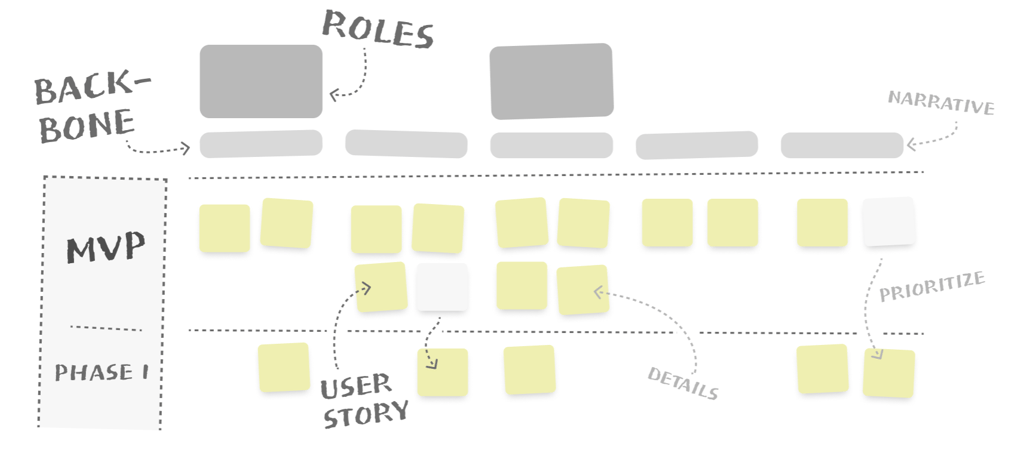
Understanding and identifying the roles involved is crucial in creating a user story map that accurately reflects the diversity of user experiences. These roles, or personas, represent the different users who interact with your product, each with their own needs, goals, and pain points. Here are some possible role examples ( note that there are a lot more ):
Regular User → Anyone who visits the app or website. They are just looking around, maybe checking out what you offer, like browsing through products or reading blog posts like this.
Logged-In User → This person has an account and logs in to use your app or website. They might have access to more features, like saving favorites, posting comments, or getting personalised recommendations.
Content Manager → Managing content on your website or app. They create the content and have specific needs to generate the most valuable content for the regular or logged-in user.
Defining the Backbone: The Epic Structure
The backbone of a user story map serves as the first sketch of the journey the user will have with our product. It is more or less an “epic” structure in agile terminology. Epics are larger, broader user stories that can be broken down into smaller, more manageable stories. In user story mapping, these are identified as the major activities or tasks the user has while interacting with our product.
Narrative Detail → When defining the backbone, you're essentially crafting the narrative arc of the user experience.
Planning Releases: Identifying MVP and Project Phases
Releases are a major part of user story mapping, allowing teams to plan the delivery of value to users incrementally.
By visualising the tasks in a user story map, the team is able to quickly understand the vision and is able to prioritise the most critical features that deliver immediate value to the user, ensuring that development efforts are aligned with user needs and business objectives from the start.
MVP & Incremental Releases
- MVP Identification: Focus on the essential features that need to be released first to meet the primary needs of your users and achieving the overall goal. The MVP is your initial release.
- Prioritising Features: Use the user story map to prioritise features based on user needs, the product's strategic goals, and technical feasibility.
- Planning Incremental Releases: After the MVP, plan subsequent releases by grouping related user stories that deliver additional value to the user. This phased approach allows for continuous improvement and adaptation based on user feedback and changing market dynamics.
Participants
In a user story mapping meeting, the main participants typically include a cross-functional team from various parts of the organisation to ensure the understanding of the product and its users.
These participants often include:
- Product Owners ( session leader )
- Development team members
- UX Designer
- Business Analysts
- Stakeholders
- User Representatives
- Quality Assurance Specialists
Get the Team Together
- Define the Backbone: Identify the major activities or tasks your user will undertake while interacting with your product.
- Break Down the Journey: Decompose these activities into smaller, actionable user stories and arrange them under each activity to create a detailed view of the user's journey.
- Prioritize and Plan: Determine the priority of these stories based on user needs and project objectives, identifying key releases along the way.
Pro Tip: Use sticky notes or digital mapping tools to make the process flexible and collaborative, allowing for easy adjustments during the flow.
User Story Mapping Example
Please note that this is a simplified version!
Lets start creating a user story map and bring the team together in a meeting ( could be split into several sessions; depending on the complexity of the feature, of cause ).
In our example, we want to integrate a simple video upload functionality to our platform. The objective could be:
“Significantly increase user engagement and diversify the content available on our platform by introducing a user-friendly video upload feature within the next quarter.”
Must-Haves for Starting
- Video Upload: Access to Upload Feature
- Video Upload: Video Selection and Upload
- Video Editing: Basic Video Details Input
- Content Management: Post-Upload Detail Editing
- User Engagement: Interaction Features
In our first iteration ( MVP ) we focus on the main functionalities to ensure a fast delivery, matching our objective.
Identify User Roles
- Content Creators → People Uploading Videos - They want to upload, edit, and manage their videos ( Content Creators )
- Viewers → People Watching Videos - They mainly want to like and share videos ( Viewers )
Assigning Roles To the Backbone
- Content Creators ( Video Upload, Video Editing, Content Management )
- Viewers ( User Engagement )
.png?width=2452&height=984&name=image-20240226-220959%20(1).png)
Key Decisions
During the meeting it could happen, that already some of relevant decisions will be made. In our example, we made the decision, that the features in Phase 1 are actually not relevant for the first iteration.
- Accessing the video editor → Editing videos was considered as not mandatory for the MVP ( e.g. setting filters, sound effects, … )
- Trimming or cutting → Trimming and cutting can also be done pre-upload. It is a nice feature, but is not considered as MVP-relevant.
- Commenting → prioritizing simplicity by focusing on likes and shares for now. Commenting, though useful, isn't essential for our MVP and may be considered later.
- Enhanced Options → Not included in the MVP to keep our initial launch focused and user-friendly. Analytics and privacy settings will be considered for future updates.
With this mapping we were able to figure out what is really relevant for our goal. Thus we already made decisions and differentiated between must haves to deliver a cool feature and could haves that are planned for the next iteration.
As mentioned, this is a simplified and fictive version of a user story map and the result, as well as the decisions could be completely different from team to team.
Conclusion
User story mapping is more than just a planning tool; it's a strategic ally in agile development. It keeps the project user-centered and strategically aligned with business goals. If you are not already using user story mapping, now is the time to start. It could be the key to unlocking your projects full potential, providing a deeper connection with your users, getting everyone on the same page, and achieving your business objectives.